
Overview
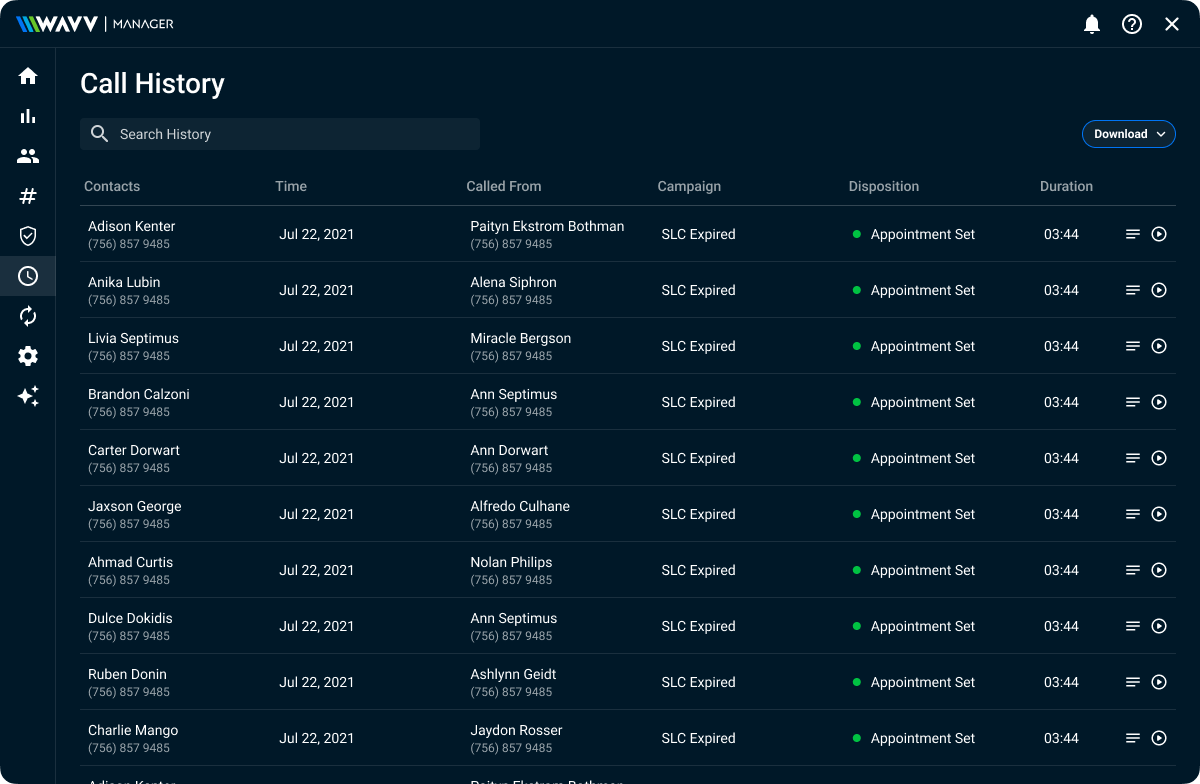
The WAVV Power Dialer maintains a record of all the calls you place for a rolling three month period. You'll see not only who was called, but when, if it was part of a call campaign, the disposition, call duration, the recording (if applicable), and call transcription.
Managing Your Call History
Select Download Call Log to export your call history as a .csv file. This will give you a detailed history of your calls for the last three months.
Use the Search bar feature to look up a call via phone number, a keyword or phrase in a recorded and transcribed call, phone number or contacts names.
The Contacts column displays the number and name of the contact that was called
The Time column displays the date and time a call was placed.
The Called From column displays the agent name and phone number they used to call.
The Campaign column will show when the call was placed as part of a call campaign. For any calls placed outside of a campaign, it will be left blank.
The Disposition is the call outcome that was selected when the call ended.
The Duration column displays the length of the phone call.
If you recorded a call, you can Play, Download, or view the Call Summary of the call from this column. (Call Summary must be toggled from the "Beta Features" tab)
IMPORTANT: Call History will delete after 90 days, so be sure to download the log if you want to keep everything!